
mucke - Music Player: local file playback
mucke - Music Player is a free multimedia app by Moritz Weber that lets you control shuffle mode with likes, exclusions, and linked songs.
Get mucke · v1.7.0mucke - Music Player is 29 MB in size, requires Android 7.0 or higher, and is free with no ads or in-app purchases. The app suits listeners who want custom playback options such as smart playlists and a personalized landing page for their local music collection.
- Version
- 1.7.0
- Size
- 29 MB
- Requires Android
- 7.0
- Updated
- Nov 1, 2026
- Category
- Entertainment
- Developer
- Moritz Weber
- Package
- rocks.mucke.github
- Free
- ✓
Screenshots
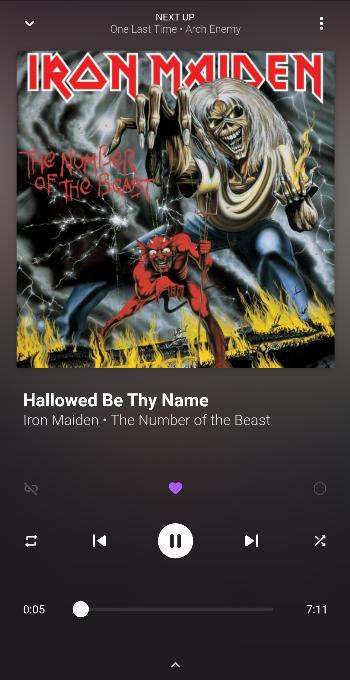
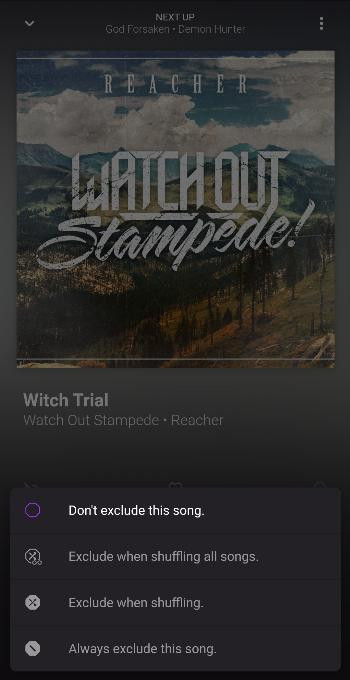
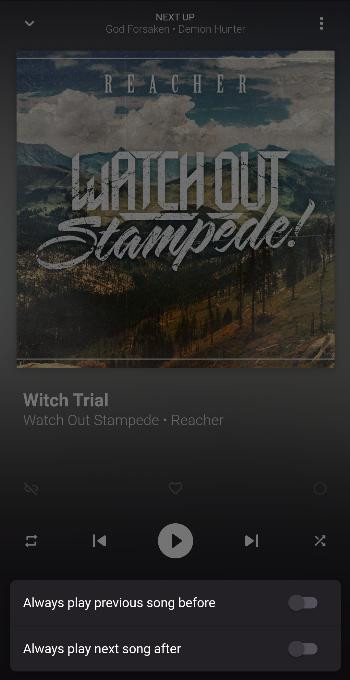
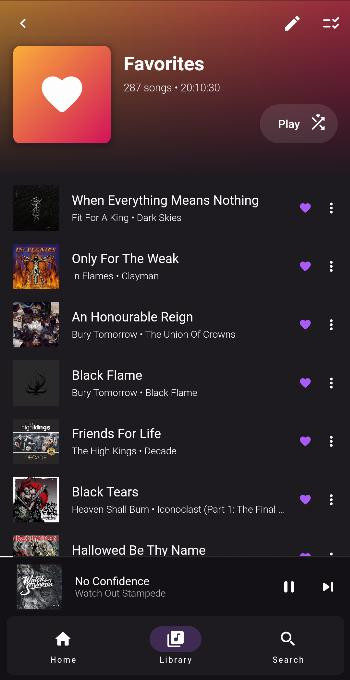
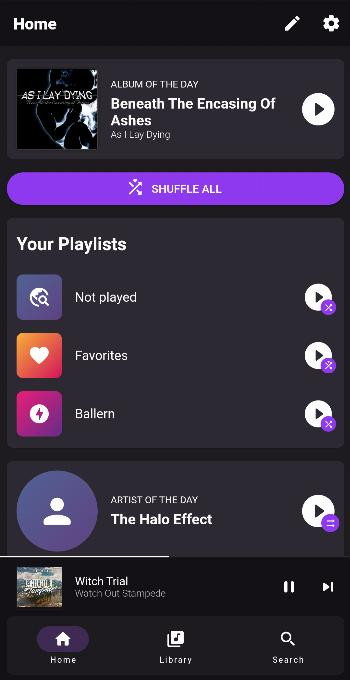
mucke - Music Player is a multimedia app by Moritz Weber that plays local audio files with an unusually high degree of control over shuffled playback. Version 1.7.0, released on November 1, 2026, is free and open source under the GPL-3.0-only license, comes in a compact 29 MB package, and runs on devices with Android 7.0 or newer. The app makes no attempt to connect to streaming catalogs or online libraries; instead, it is built entirely around the music you already store on your device, which makes it a focused alternative to players that spread their attention across services, radios, and recommendations.
Where most music apps treat shuffle mode as an unpredictable black box, mucke exposes its inner workings. You can like individual songs so they are chosen more often in random playback, exclude tracks that should never appear in shuffle, and link multiple songs together so they always play back-to-back even when the rest of the queue is randomized. For anyone with a large local library, this transforms shuffle from a gamble into a tunable experience: albums can stay in order, favorites can surface more frequently, and songs you skip every time can simply disappear from rotation.
Beyond playback control, the app offers smart playlists created by filtering and sorting your collection, so you can quickly assemble views based on the metadata and ordering rules you define. The landing page can also be customized to match the way you actually start listening, giving you a shortcut to the playlists, filters, or sections you use most. In short, mucke is aimed at experienced Android users who maintain their own music files and want a player that is predictable, configurable, and free of online distractions.
Key features
- Plays music from your local collection, with no streaming or cloud dependency
- Like songs to make them appear more often in shuffle mode
- Exclude individual songs so they are skipped when shuffling
- Link songs together so they stay back-to-back even during randomized playback
- Create smart playlists by filtering and sorting your library
- Customize the landing page for a quicker start with the content you use most
How to install
- Tap the download button on this page to save the APK file, which is about 29 MB and requires Android 7.0 or newer.
- If Android asks for permission, allow your browser or file manager to install apps by enabling the "Install unknown apps" setting for that app.
- Open the downloaded APK from your notifications or your Downloads folder.
- Tap Install and wait for the installation to complete.
- Tap Done or Open, then launch mucke from your app list and begin browsing your local library.
Pros
- Free and open source under the GPL-3.0-only license
- Compact 29 MB package that stays light on storage
- Genuine control over shuffle frequency, exclusions, and forced track order
- Smart playlists built from filter and sort rules
- Customizable landing page for faster navigation
- Regular version updates, with 1.7.0 following 1.6.0
Cons
- Limited to local files; no streaming, casting, or online catalog integration
- Requires Android 7.0 or newer, which excludes very old devices
- Lacks the extras of feature-heavy players, such as lyrics, tag editors, or network support
Version history
| Version | Size | Requires Android | Updated |
|---|---|---|---|
| 1.7.0 | 29 MB | 7.0 | Nov 1, 2026 |
| 1.6.0 | 74 MB | 7.0 | Sep 1, 2026 |
For listeners who keep their music files on the device and want a player that gives them precise rules for shuffle behavior, plus the ability to build filtered smart playlists and a home screen that matches their habits.
Take a moment to link songs from the same album or consecutive tracks so they remain intact during shuffle, and use the like and exclude options to nudge randomness toward your favorites. Setting up a few smart playlists with the filter and sort tools early on pays off, because the customizable landing page can then give you one-tap entry to those views instead of requiring repeated navigation.
FAQ
How do I install the mucke APK on my Android device?
Download the APK file and open it on your device. If prompted, allow installation from unknown sources. Your device needs Android 7.0 or newer, and the APK is about 29 MB.
What is the current version of mucke?
The current version is 1.7.0, released on November 1, 2026. The previous version, 1.6.0, came out on September 1, 2026.
Does mucke cost money or contain in-app purchases?
The app is free. The available information does not list any in-app purchases or subscription options.
Can I use mucke offline?
Yes. mucke is designed for local music files stored on your device, so playing your collection does not depend on an internet connection.
How does mucke handle shuffle playback?
You can like songs to hear them more often in shuffle, exclude songs from shuffle, and link songs together so they play back-to-back.
Are there other local music players I could try instead?
Other Android apps can play local music, but mucke offers unique options like liking or excluding songs in shuffle and linking tracks to play consecutively.
If your music lives on the device and ordinary shuffle has always felt too random, mucke offers a focused, honest solution: it is lightweight, open source, and genuinely configurable around the way you actually listen.
Similar apps







Updated: Nov 11, 2026