
BCR-GUI: Companion App for Call Recording
BCR-GUI is a companion app by Claudio Nicora that manages call recordings from the BCR Android application.
Download BCR-GUI · v1.16.0BCR-GUI is a free companion app for the Basic Call Recorder (BCR) Android application, offering a user-friendly way to manage call recordings without relying on a file manager. It is designed for BCR users who want to search and extract call information from audio filenames more easily.
- Version
- 1.16.0
- Size
- 6.7 MB
- Requires Android
- 10
- Updated
- Oct 25, 2026
- Category
- Communication
- Developer
- Claudio Nicora
- Package
- com.github.nicorac.bcrgui
- Free
- ✓
Screenshots
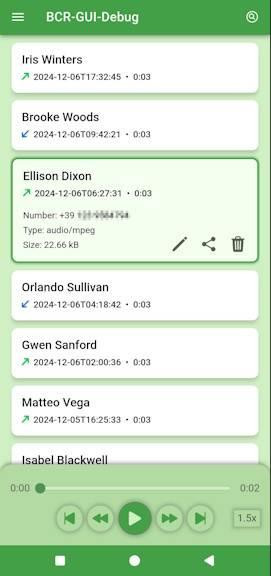
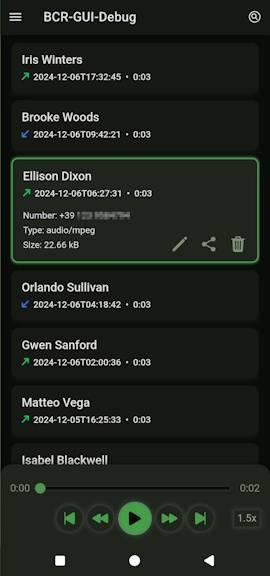
BCR-GUI is a companion utility by Claudio Nicora that gives the recordings made by the BCR (Basic Call Recorder) Android app a proper browsing interface instead of leaving them buried in a file manager. The core call recording work stays where it belongs, inside BCR, while this app takes over the job of organizing and presenting the audio files that BCR produces. The developer's reasoning is straightforward: call recording on Android is demanding technical work, and the author of BCR prefers to keep that project basic and focused, so a separate front end makes sense for everything that comes after a call ends.
Anyone who has tried to review a growing archive of call audio knows the problem. Files carry their details inside the filename, so pulling out the caller, the date or the direction of a call means decoding text by eye. As the list grows, finding one specific conversation becomes slow and error prone, and a general-purpose file browser was never designed for this kind of content. This app replaces that manual routine with a dedicated view built around the recordings themselves.
Version 1.16.0 arrived on 2026-10-25, continuing a line that began with 1.15.0 on 2026-06-17 and moved through 1.15.2 on 2026-08-04 and 1.15.3 on 2026-08-30. The app was first released on 2026-08-04, is free to use, carries the GPL-3.0-only license, and is distributed as a 6.7 MB package for Android 10 and above. It sits in the Phone & SMS category and remains a companion rather than a replacement for the recorder itself.
Key features
- Browses call recordings generated by the BCR app in a dedicated list instead of a generic file manager
- Surfaces call details that would otherwise be hidden inside audio filenames
- Search support so a specific recording can be located as the collection grows
- Companion design that leaves recording duties to BCR and handles only management
- Free to use under the GPL-3.0-only license
- Current build is version 1.16.0, released 2026-10-25, at 6.7 MB
- Runs on Android 10 or newer
How to install
- Tap the download button on this page to get the 6.7 MB APK file.
- When Android prompts you, allow your browser or file manager to install apps by enabling the "Install unknown apps" permission for that app.
- Open the downloaded APK file from your notifications or your file manager.
- Tap Install and wait for the package to finish copying.
- Open the app once installation completes; it requires Android 10 or newer.
Pros
- Turns a folder of cryptic audio filenames into a readable, searchable list
- Keeps the recorder itself simple by handling management separately
- Small download at 6.7 MB
- Free and open source under GPL-3.0-only
- Works on Android 10 and above, covering a wide range of devices
Cons
- Only useful if you already use the BCR recorder, since it is a companion app
- Does not perform call recording itself
- The 6.7 MB package is not large, but it is a second app to keep updated
Version history
| Version | Size | Requires Android | Updated |
|---|---|---|---|
| 1.16.0 | 6.7 MB | 10 | Oct 25, 2026 |
| 1.15.3 | 6.5 MB | 5.1 | Aug 30, 2026 |
| 1.15.2 | 6.5 MB | 5.1 | Aug 4, 2026 |
| 1.15.0 | 6.5 MB | 5.1 | Jun 17, 2026 |
People who already record calls with BCR and want a clearer way to review them; users who keep months of call audio and need to search it quickly; and anyone who finds digging through a file manager for a single conversation too tedious.
Confirm that your recorder is actually producing files before judging the browsing experience, since an empty or short list makes the search and detail views hard to evaluate properly.
FAQ
Is BCR-GUI free to use?
Yes, BCR-GUI is free. It is released under the GPL-3.0-only license, so you can download and use it without paying.
Which Android version do I need to run BCR-GUI?
The app requires Android 10 or higher. If your device runs Android 10 or a newer version, it should be compatible.
How large is the BCR-GUI APK file?
The APK file is about 6.7 MB. This makes it a lightweight download that won't take up much space on your device.
Do I need to create an account or sign in to use BCR-GUI?
No, BCR-GUI does not require an account. You can download and use it without registering or signing in.
What permissions does BCR-GUI ask for?
The app requests permissions needed to manage call recordings, such as reading and managing audio files on your device. It does not ask for unnecessary access beyond what is required for its core functionality.
How do I update BCR-GUI to a new version?
To update, simply download the latest version from this page and install it over your current installation. Your existing recordings and settings will be preserved.
BCR-GUI solves a narrow but genuinely annoying problem for a specific audience. If BCR is already part of your routine, this companion adds a practical layer of organization for a small download and no cost. If you do not record calls with BCR, it will not do anything on its own.
Similar apps




Updated: Nov 2, 2026